Engineering Markup on iOS
Client
RedEye Apps
Year
2022
Location
Brisbane, QLD
Share


RedEye's web app included a popular Markup feature where Engineers and Drafters could perform "Redline Markups" to create specialised digital annotations to Engineering Drawings.
Despite the success of this feature on web, RedEye were struggling to gain traction on mobile but were unsure of what improvements to make.

Break it Down with Blockframes
By reducing the visual influence of colour, text and iconography, we could focus on the navigation and overall usability first.
Existing Navigation
Simple doesn't necessarily mean easy. The existing navigation was designed for all markup tools to be visible at once, however, relied on disabled states and error states in order to understand whether the tool was available to be used. The navigation was quite flat and simple however users were frequently making mistakes as to which tools could be edited and when. The good intention of "less clicks" unfortunately resulted in a higher cognitive load.

.jpg)
Future Navigation
The new navigation design is quite deep in comparison however allowed for the properties of each tool to be contextualised for the user. Tools that are uneditable or properties that are not applicable to the active tool are not shown to the user to help prevent errors and reduce frustration. Only the relevant tools are shown at the relevant time.

%20Suggested%20iOS%20Markup%20Tool%20Menu%20IA%20(2).jpg)

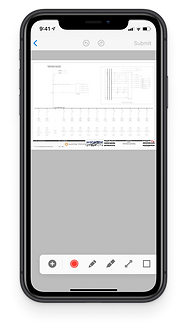
Scrollable Toolbar
Allowing for a greater touch point of each markup tool with no more than 6 options able to be shown at once on the smallest device size. Optimised for use on a tablet in landscape mode which was the ideal and most popular form factor, however still scaling naturally to any other device size.
Full Screen View
Allowing users to zoom in and navigate details of the drawing before selecting a markup tool. Making it easier to find the right location, before finding the right tool.
Previously users would need to explicitly select full screen view however they are now able to optimise their screen real-estate immediately


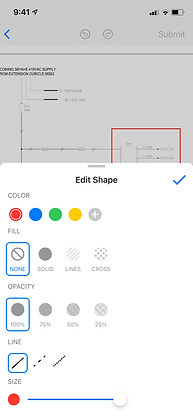
Contextual Properties
Custom Properties Menu for each Markup Element to give the users complete control over each element they apply. Additional customisations such as the line type and colour were added to align with industry standards from other leading Engineering Tools. Previously, all options were shown regardless of which were logical or technically available


Pin a Photo or Comment
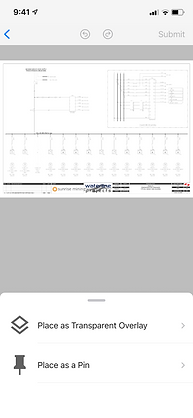
Introduced a new feature to pin a photo or pin a comment. This allowed users to annotate with text or images without impacting the drawing itself and preserving the original documentation. Users could toggle these on and off from view and the system reviewers/approvers would receive the annotation and it not impact how the drawing is viewed to other users.